Typing Speed for Government Exams 2026: SSC CHSL, CGL, DEO & Court Typing Test Guide
Every year lakhs of candidates clear the written stage of SSC, railway, court and state government exams, only to get stuck at the typing test. The written exam decides your rank, but if you can't type fast and accurately enough, you don't get the post. The good news: typing is a skill anyone can build in a few weeks with the right method.
This guide explains the typing speed required for popular government exams, how WPM and key depressions are calculated, how mistakes are counted, how to prepare for English and Hindi typing tests, and a simple 30-day plan to reach 35 WPM. You can practise everything with our free online typing speed test, which supports both English and Hindi.
Key takeaways
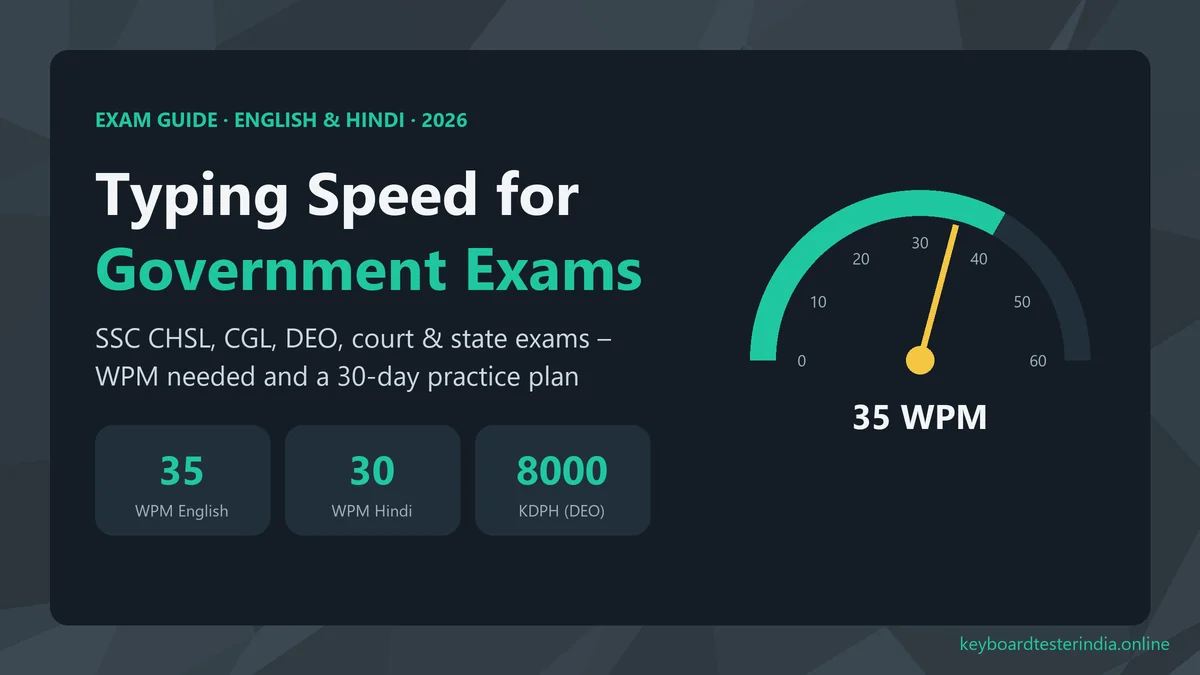
- SSC CHSL LDC/JSA posts ask for about 35 WPM in English or 30 WPM in Hindi in a 10-minute test.
- DEO posts and the SSC CGL DEST ask for 8,000 key depressions per hour, about 2,000 key depressions in 15 minutes.
- To convert, WPM = KDPH ÷ 300. One word = 5 key depressions.
- Typing tests are usually qualifying: you must pass, but the marks don't add to your rank.
- Practise touch typing 20–30 minutes a day and aim for 40 WPM with 95%+ accuracy to be safe on exam day.
Typing speed required for popular government exams
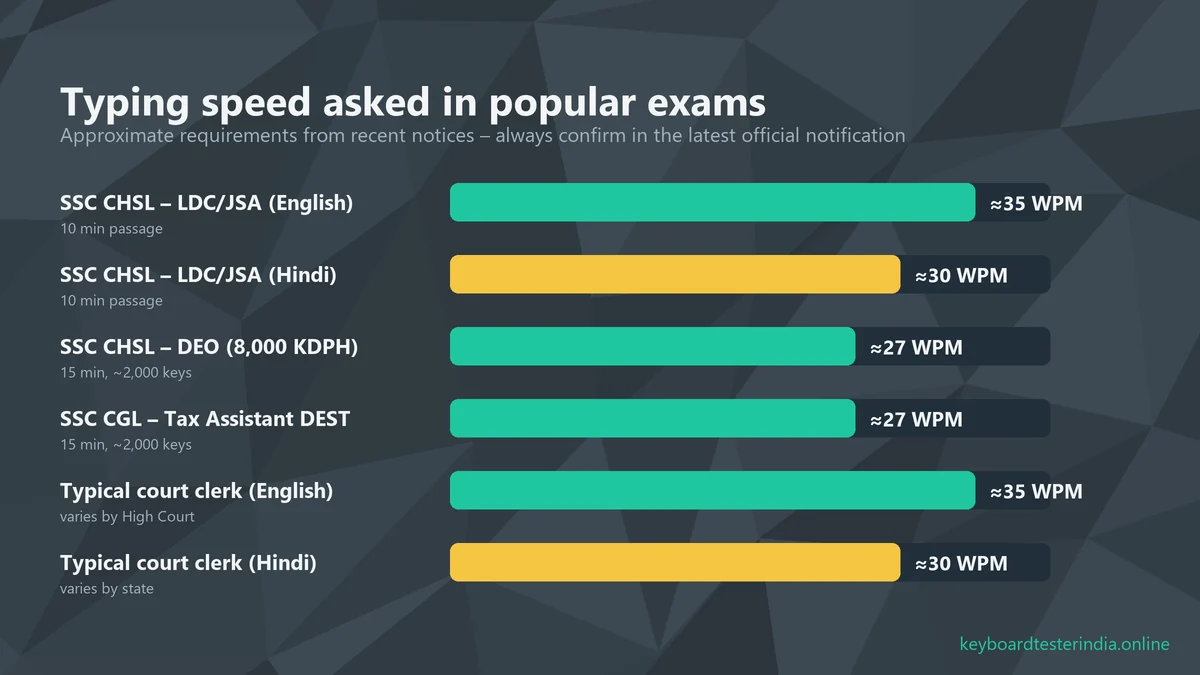
Requirements change from notification to notification, so treat the table below as a guide and always read the official notice of your exam before you start practising. These figures are based on recent notices and are the most commonly asked speeds.
| Exam / post | Language | Speed required | Test duration |
|---|---|---|---|
| SSC CHSL – LDC / JSA | English | 35 WPM (about 10,500 KDPH) | 10 minutes |
| SSC CHSL – LDC / JSA | Hindi | 30 WPM (about 9,000 KDPH) | 10 minutes |
| SSC CHSL – DEO / DEO Grade A | English | 8,000 KDPH | 15 minutes (about 2,000 key depressions) |
| SSC CGL – Tax Assistant (DEST) | English | 8,000 KDPH | 15 minutes (about 2,000 key depressions) |
| RRB NTPC – clerk / typist posts | English / Hindi | Usually 30 WPM English, 25 WPM Hindi | Check the notice |
| High Court and district court clerks | English / Hindi | Often 30–40 WPM | Varies by state |
Many state exams, such as state subordinate selection boards and police clerical posts, have their own rules. Some ask for 25–30 WPM in Hindi, and some use a combined English and Hindi test. When in doubt, train for 40 WPM in English or 35 WPM in Hindi, and you'll clear almost any typing test.
WPM vs KDPH: how typing speed is measured
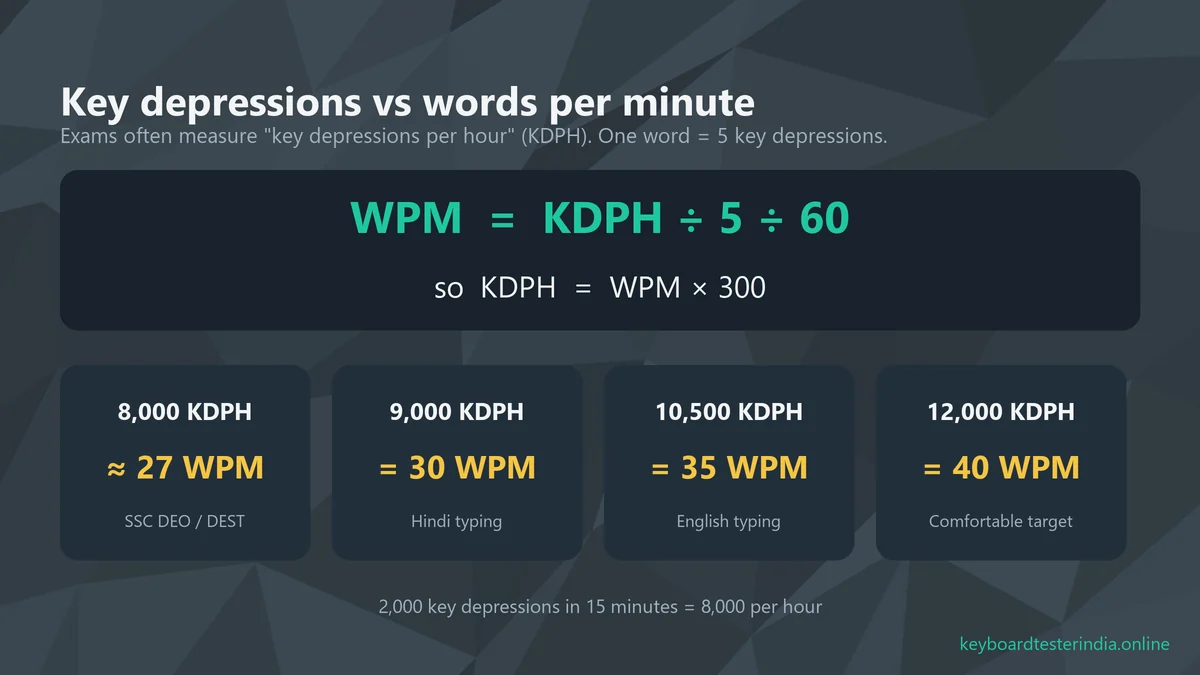
Exams use two ways to describe typing speed, and it confuses many candidates:
- WPM (words per minute): the number of words you type correctly in one minute. For fairness, a "word" is counted as 5 key depressions, including spaces and punctuation, not the actual number of words.
- KDPH (key depressions per hour): the number of keys you press correctly in one hour. Every letter, space, comma and capital (with Shift) counts.
The conversion is simple: WPM = KDPH ÷ 5 ÷ 60 = KDPH ÷ 300. So the "8,000 key depressions per hour" asked for DEO posts equals about 27 WPM, which is lower than the 35 WPM needed for LDC/JSA. But DEO tests last longer (15 minutes) and you must type the full passage of around 2,000 key depressions, so stamina matters too.
Our typing test calculates WPM the same standard way (correct characters ÷ 5 ÷ minutes), so the score you see in practice is directly comparable to exam requirements.
How the computer typing test works
Most central government typing tests today are computer-based and follow a similar pattern:
- You're seated at a computer provided by the exam centre. You can't bring your own keyboard.
- A short practice passage is usually given first so you can get used to the keyboard.
- The main passage appears on the screen, often in the top half, with a typing box below.
- You type the passage within the time limit: 10 minutes for LDC/JSA, 15 minutes for DEST/DEO.
- The software compares your text with the original and counts full and half mistakes.
Because the keyboard is unfamiliar, many candidates type 10–20% slower than at home. Practise on different keyboards (a friend's laptop, a cyber café, a college lab), and use our keyboard tester on any computer you practise on to make sure no keys are faulty or sticky.
How typing mistakes are counted
Speed alone isn't enough. Every exam has an allowed error percentage, usually different for general and reserved categories, and crossing it means failing even if your speed is high. The exact rules differ between SSC, railway, courts and states, but most typing evaluations follow a similar system of full and half mistakes:
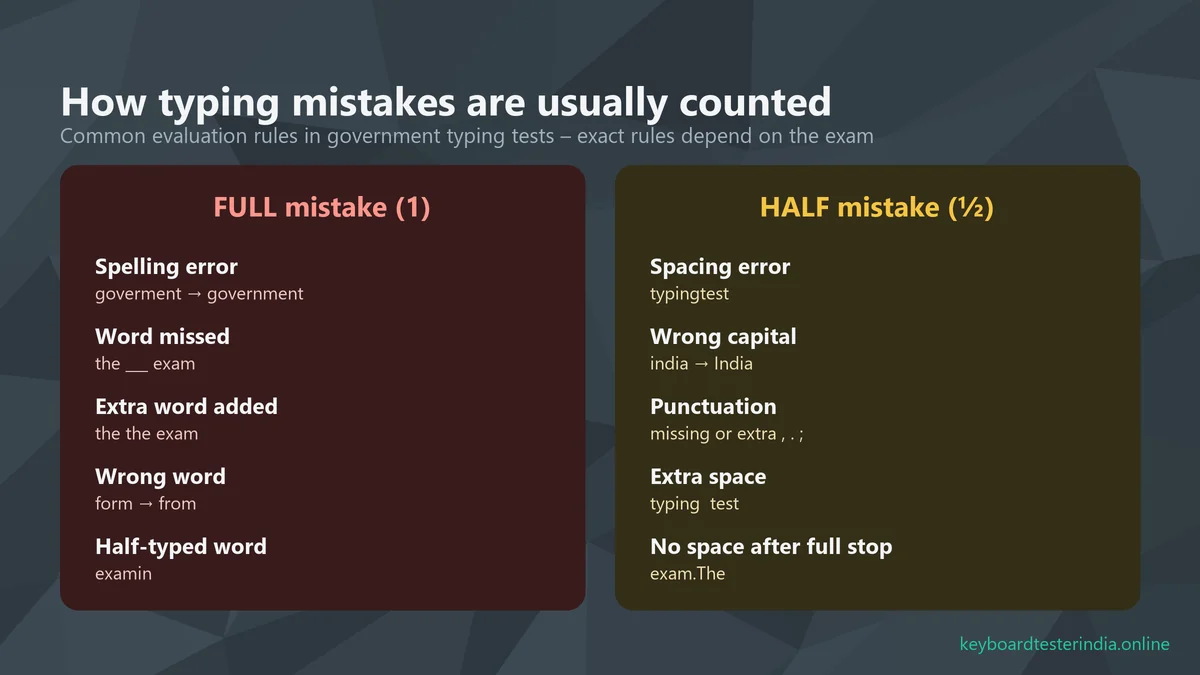
Usually counted as a full mistake
- Spelling errors, including a repeated, missing or wrong letter ("goverment" for "government")
- Omitting a word or figure from the passage
- Adding a word that isn't in the passage, or typing a word twice
- Substituting a wrong word ("form" for "from")
- Leaving a word half typed
Usually counted as a half mistake
- Spacing errors: no space between words ("typingtest") or extra spaces inside a word
- Wrong capitalisation ("india" instead of "India")
- Missing, extra or wrong punctuation
A common formula is: Error % = (Full mistakes + Half mistakes ÷ 2) × 100 ÷ Total words in the passage. Check the official instructions for your exam, as the allowed percentage and calculation can differ. The lesson for preparation is clear: accuracy is more important than raw speed. A candidate typing 38 WPM with 2% errors does far better than one typing 45 WPM with 9% errors.
Worked example: calculate your own error percentage
Say the passage has 350 words. In your mock test you make 4 spelling errors, 1 missed word and 1 extra word (6 full mistakes), plus 3 spacing errors and 1 capitalisation error (4 half mistakes).
- Full mistakes = 6
- Half mistakes = 4, which count as 4 ÷ 2 = 2
- Total = 6 + 2 = 8
- Error % = 8 × 100 ÷ 350 = 2.29%
Do this calculation after every mock test for a week. You'll quickly see which kind of mistake costs you most, whether careless spacing, capitals or spellings of long words, and you can drill exactly that.
Typing test vs DEST vs Computer Proficiency Test
Different posts use different skill tests, and candidates often prepare for the wrong one:
| Skill test | What it checks | Typical posts |
|---|---|---|
| Typing test | Speed (WPM) and accuracy on a text passage, in English or Hindi | LDC, JSA, court clerks, typists |
| DEST (Data Entry Skill Test) | Key depressions per hour on an English passage; mainly speed of entry | DEO, Tax Assistant |
| CPT (Computer Proficiency Test) | Practical tasks in word processing, spreadsheets and presentations | Some SSC CGL posts such as Assistant Section Officer |
If your post requires a CPT rather than a typing test, typing speed still helps, but you should also practise formatting documents, simple spreadsheet formulas and making slides within a time limit.
Preparing for the Hindi typing test
Hindi typing tests usually ask for a slightly lower speed (around 30 WPM), but they are harder for most candidates because of matras, half letters and conjuncts. Keep these points in mind:
- Know your layout. Computer-based tests generally use Unicode Hindi with layouts like Remington (GAIL) and InScript. Some state exams still use Kruti Dev (Remington-based). Check which layout your exam allows and practise only on that one.
- InScript is built into Windows. Add Hindi from Settings › Time & language › Language & region. Remington GAIL needs a separate typing tool.
- Practise matras and half letters (क्ष, त्र, ज्ञ, श्र) separately. These are where most Hindi mistakes happen.
- Don't switch layouts during preparation. Muscle memory takes weeks to build and is easily confused.
You can take a Hindi typing test on our typing speed test page: choose हिन्दी and type with your Hindi keyboard enabled.
Learn touch typing first: the foundation
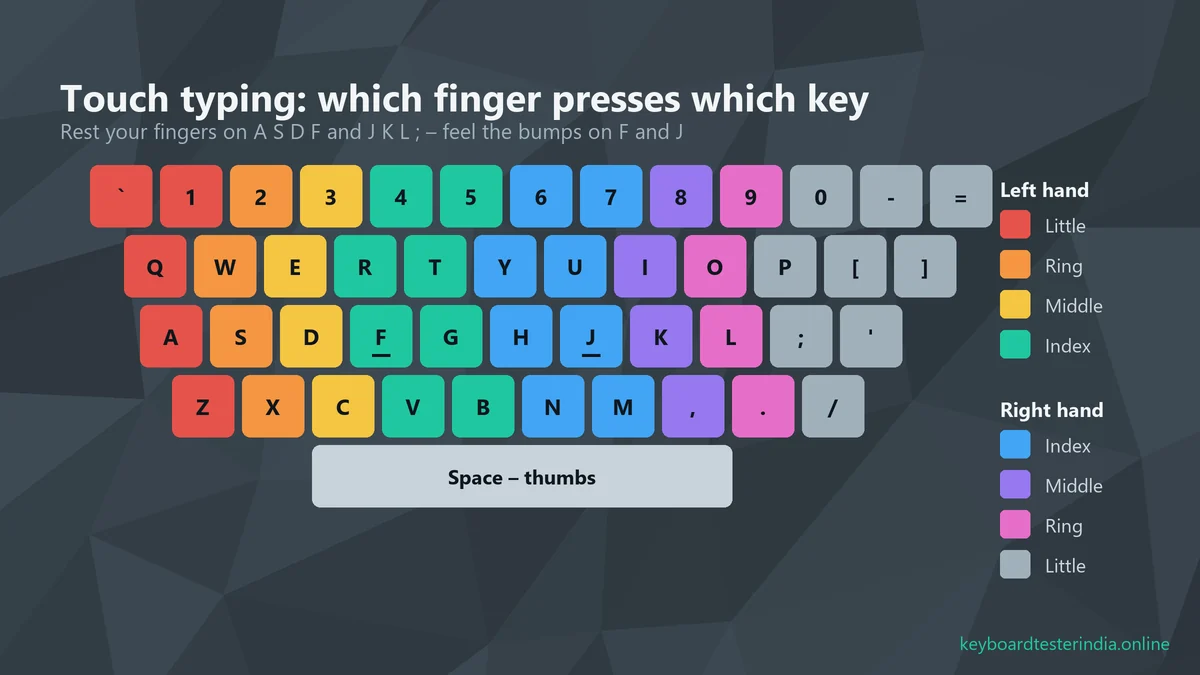
If you still look at the keyboard or use two fingers, touch typing will feel slower for the first week, but it's the only reliable way to reach 35–40 WPM. In touch typing each finger is responsible for specific keys, and your eyes stay on the passage, not the keyboard.
- Home row: left fingers on A S D F, right fingers on J K L ;. Feel the small bumps on F and J.
- Thumbs rest on the spacebar.
- Each finger moves up and down its own diagonal column and returns to the home row.
- Use the opposite hand's little finger for Shift: right Shift for left-hand letters, left Shift for right-hand letters.
Posture and setup
- Sit straight with feet flat on the floor and elbows at about 90°.
- Keep your wrists slightly raised. Don't rest them heavily while typing.
- Place the screen at eye level and about an arm's length away.
- Take a short break every 20–30 minutes to avoid strain.
30-day practice plan to reach 35 WPM
Consistency beats long sessions. 20–30 focused minutes every day will take you further than three hours once a week. Here's a plan that works for most beginners:
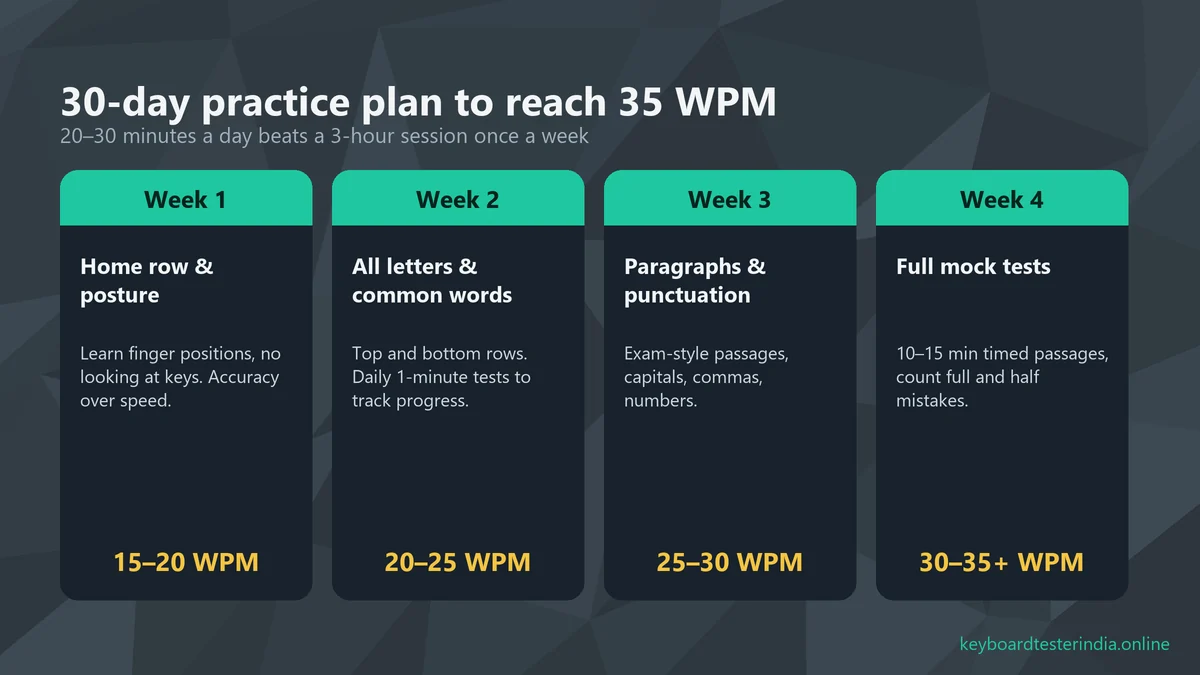
Week 1: Home row and correct fingering (target 15–20 WPM)
Learn finger positions using simple drills (asdf jkl; fjfj dkdk). Don't look at the keyboard; cover your hands with a cloth if you have to. Accuracy is everything this week. Speed will come later.
Week 2: All letters and common words (target 20–25 WPM)
Add the top and bottom rows. Practise common English words like "the", "and", "government", "department" and "officer". Take one 1-minute typing test every day and write down your WPM and accuracy.
Week 3: Paragraphs, capitals and punctuation (target 25–30 WPM)
Switch to exam-style paragraphs from newspapers or old question papers. Practise capital letters with the correct Shift key, numbers, commas and full stops. Start checking your mistakes by full and half error type.
Week 4: Full mock tests (target 30–35+ WPM)
Do one full-length mock test daily: 10 minutes for LDC/JSA or 15 minutes for DEO/DEST. Calculate your error percentage the way the exam does. Use the remaining time to drill the words you get wrong most often.
After 30 days, keep doing at least one mock test a day until your exam. Speed drops quickly if you stop practising.
Daily drills that build speed fast
Mix these drills into your daily 20–30 minutes. Each one targets a specific weakness:
- Warm-up (3 minutes): type the home row and the alphabet slowly and perfectly:
asdf jkl; asdf jkl;, thenthe quick brown fox jumps over the lazy dog. - Common-word sprints (5 minutes): 1-minute tests using common words. Try to beat yesterday's WPM without dropping below 95% accuracy.
- Problem-word drill (5 minutes): keep a notebook of words you mistype often, like "government", "responsibility" or "administration", and type each one ten times.
- Passage practice (10 minutes): type a newspaper editorial or an old exam passage exactly as written, including capitals and punctuation.
- Review (2 minutes): count your full and half mistakes and note your WPM in a simple table. Watching the numbers rise is great motivation.
Is your typing speed good? Quick benchmarks
| Speed | What it means |
|---|---|
| Below 25 WPM | Beginner. Focus on touch typing and accuracy. |
| 25–30 WPM | Enough for many Hindi tests and DEO/DEST, but cutting it close. |
| 30–40 WPM | Meets most English and Hindi government typing requirements. |
| 40–55 WPM | Comfortable for every typing test, with room for exam nerves. |
| 55+ WPM | Fast. Typical of professional typists and data entry experts. |
Exam-day tips
- Use the practice passage to check every key, especially Shift, Backspace and the spacebar. Report a faulty keyboard to the invigilator immediately.
- Read a few words ahead while typing, so your fingers never wait for your eyes.
- Don't stop to fix every small error if correcting it costs more time than it saves. Missing a word is usually a full mistake, so keep moving.
- Keep a steady rhythm. Bursts of speed followed by long pauses cause more mistakes.
- Watch the time and make sure you complete as much of the passage as possible, especially in DEO tests.
Common preparation mistakes
- Practising only speed. Typing fast with many errors builds bad habits that are hard to fix.
- Looking at the keyboard. It caps your speed at around 25–30 WPM.
- Starting too late. Many candidates begin after the written result. Start typing practice along with your written preparation.
- Using only a laptop keyboard. Exam centres usually have full-size desktop keyboards with a different feel and layout. Practise on both.
- Ignoring the official instructions. Every notification explains the rules for speed, errors and layout. Read them carefully.
Free tools to practise
Our Typing Speed Test gives you 15-second, 30-second, 1-minute and 2-minute tests in English and Hindi, with live WPM, accuracy and your best score saved in your browser. If letters double up or keys feel unreliable, check your keyboard with the Keyboard Tester and the Key Chatter Test before blaming your fingers.
Failed the typing test before? Do this differently
Many candidates clear the written exam two or three times but keep failing the skill test. If that's you, the usual cause isn't talent; it's the way you practise:
- Record your real exam-condition score. Take a 10- or 15-minute test on an unfamiliar computer and count errors strictly. Home practice on short 1-minute tests often hides how much speed drops over a long passage.
- Fix accuracy first. If your error rate is above the allowed limit, slow down by 5 WPM for two weeks and type perfectly. Speed returns quickly once accuracy is a habit.
- Train for stamina. Finishing strong in minute 9 or minute 14 matters as much as starting fast. Build up to back-to-back long passages.
- Practise under pressure. Ask a friend to time you, or practise in a noisy room, so the exam hall feels familiar.
Which keyboard should you practise on?
You don't need an expensive keyboard to clear a government typing test, but the right setup makes practice easier:
- A full-size desktop keyboard is closest to what exam centres use. A basic USB keyboard costs only a few hundred rupees and works with any laptop.
- Avoid practising only on a phone or tablet. Mobile typing builds completely different habits and won't help in a computer-based test.
- Check your keyboard regularly. A sticky Spacebar or a key that types twice will ruin your accuracy and your confidence. Test every key with our keyboard tester and run the chatter test if letters repeat.
- Laptop users: if you're on a laptop with a cramped keyboard, practise on a desktop keyboard at least a few times a week before your exam.
Typing test vs stenography: don't confuse them
Stenographer posts (for example SSC Stenographer Grade C and D) have a different skill test. You take dictation in shorthand at a fixed speed, often 80 or 100 words per minute, and then transcribe it on a computer within a time limit. Fast, accurate typing is still essential for the transcription part, but you also need shorthand training. If you're preparing for steno posts, use this guide for the typing side and a separate course for shorthand.
Summary
For most government typing tests you need 35 WPM in English or 30 WPM in Hindi, or 8,000 key depressions per hour for DEO and DEST posts, with errors within the allowed limit. Learn touch typing, practise 20–30 minutes every day, focus on accuracy before speed, and take regular timed mock tests. With a month of steady practice, most candidates can comfortably clear the typing stage. Good luck with your exam!
Frequently asked questions
What typing speed is required for SSC CHSL?
For LDC/JSA posts, recent SSC CHSL notices ask for 35 words per minute in English or 30 words per minute in Hindi, tested on a 10-minute passage. For DEO posts the requirement is a data entry speed of 8,000 key depressions per hour, which is about 2,000 key depressions in 15 minutes. Always confirm in the latest official notification.
Is 30 WPM enough for government jobs?
30 WPM is enough for most Hindi typing tests and for many DEO-type data entry tests, but most English typing tests such as SSC CHSL LDC/JSA ask for 35 WPM. Aim for at least 40 WPM with high accuracy in practice, because exam nerves and an unfamiliar keyboard usually reduce your speed.
How do I convert KDPH to WPM?
Divide key depressions per hour by 300. One word is counted as 5 key depressions and an hour has 60 minutes, so 8,000 KDPH is about 27 WPM, 9,000 KDPH is 30 WPM and 10,500 KDPH is 35 WPM.
Is the SSC typing test qualifying or scoring?
The SSC typing test and DEST are qualifying in nature. You need to reach the required speed with errors within the allowed limit, but the marks do not add to your final merit score.
Which Hindi keyboard layout is used in the SSC typing test?
Recent computer-based typing tests generally use Unicode Hindi and offer layouts such as Remington (GAIL) and InScript. Some state-level exams still use Kruti Dev. Check the layout allowed in your exam notice and practise on the same one.
How long does it take to reach 35 WPM?
Most beginners who practise touch typing for 20 to 30 minutes every day reach 30 to 35 WPM in about four to six weeks. If you already type with two fingers, it may first feel slower, but touch typing becomes much faster within a few weeks.
Test your laptop for free
Use these free tools while you follow this guide. They run in your browser, with nothing to install.

We build free online tools to test keyboards, mice, screens and other laptop parts, and write practical guides for laptop and PC users across India. Spotted something out of date? Let us know.